-
Office of Information Technology
Updating Microsoft Windows |
Patches are released on a regular basis for the current Microsoft Windows operating systems. The current versions of Windows supported by Microsoft are:
Windows XP
Windows 2000
Windows ME  (support expires 12/31/2004)
Windows 98  (support expires 1/16/2004)
Please note that Windows NT and Windows 95 are no longer supported. It is important to regularly install the updates that Microsoft designates as 'critical' in order to prevent remote intruders from gaining control of your computer.
Windows Update
Automatic Updates for Windows XP
Log in with an account with Administrator access.
Open the System control panel.
    Start menu->Control Panel
    In the new window, open System.
        If you don't see System here, click on Switch to Classic View.
    --- or ---
    Right-click on My Computer
    Select Properties from the pop-up menu.

Click on the Automatic Updates tab.
Check the "Keep my computer up to date" checkbox.
Select your choice for being notified about updates in the Settings section.
The window should look like this: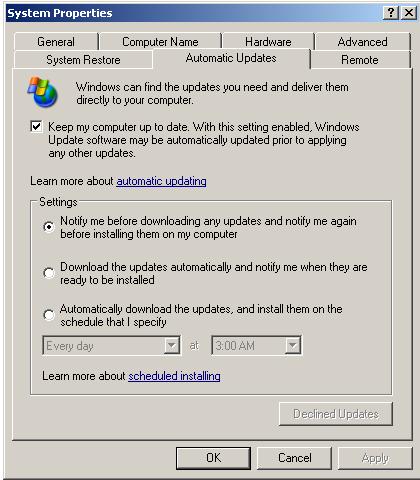
Questions? Send mail to help@life.illinois.edu. |
Return to Frequently Asked Questions